Google gmail team has recently enhanced the Undo Send feature in gmail, which allows user to unsend emails after you have sent them. You could unsend emails for up to 5 seconds until now, as Gmail delayed the emails for 5 seconds before it actually sent them.
Gmail now allows you to dial the delay duration up to 30 seconds. You can change the “Send Cancellation Period” to 5, 10, 20 or 30 seconds by visiting Gmail > Settings > General > Undo Send
Thats It!!!
Friday, September 10, 2010


Wednesday, September 1, 2010
MYSTERY BEHIND NAME AND COLOR SCHEME OF GOOGLE
Is there any mathematical logic behind the Google logo?The fact is that Google loves numbers:
- Google is named after a Googol, which is a 1 followed by 100 zeros. They didn’t use the original spelling because someone made a mistake, which was fortuitous since googol.com was taken, but google.com was available.
- Google’s buildings are numbered 0, 1, e, pi, and phi; all of which have mathematical significance.
- Google’s first IPO raised $2,718,281,828, which is the product of “e” and $1 billion, where “e” is the base of the natural logarithm.
- For their second public offering Google will sell 14,159,265 shares, which is the first 8 digits after the decimal point in pi (3.14159265)
Google played with numbers to select and attract mathematicians. There were the numbers again: pi and e.
Now take a closer look at the Google logo:

How did they decide which colors to pick? Just a random pick? I don’t think so.. Google will not do anything random or without a reason. And the colors don’t appear random to me. When we take a closer look at the colors and play around you’ll see the earlier mentioned favorite number again: e.
The colors of the logo are blue red yellow blue green red. So that makes brybgr. Seems meaningless, but let’s get it going on in Google-style and translate this to the numbers of the alphabet (a=1, z=26).
b r y b g r = 2 18 25 2 7 18
Hey! 2 18 25 2 7 18
2718 looks familiar, and it is because there’s e again! e = 2,718…
2718 looks familiar, and it is because there’s e again! e = 2,718…
Is this a coincidence? I don’t think so. But I don’t see any logic in the rest of it. So maybe there’s someone that can sort it out. You’ll be the first!
Some more help or logic: I mentioned Googol. And there is also something called Googolplex. I don’t believe Google made a mistake in speling in Googol. They just really wanted that e in there name. The colors may explain in Google-style how they did come from googol(plex) to Google. The only thing we have to do is solve it..
Monday, August 30, 2010
Create a Keyboard Shortcut to Open a Folder
Do you have a folder to which you want instant access from anywhere on your computer? For example, if you want the My Music folder to pop up while Internet Explorer or Word is maximized, follow these steps:
1.Select the folder in Windows Explorer.
2.Create a shortcut, and place it on the desktop. (You create a shortcut by opening the folder, pointing to New on the File menu, then clicking Shortcut. Drag the shortcut to your desktop.)
3.Right–click the new shortcut, and then click Properties.
4.In the Properties dialog box, click the Shortcut tab, and in the Shortcut key box, enter a Control key combination or a Control–Shift key combination, (that is, CTRL+ALT+M or CTRL+SHIFT+M when M is for music), and then click OK.
Anytime you hit the key combination you specified, your folder will open, even when other programs are maximized! This tip can be applied to folders, programs, and text file shortcuts that are placed on the desktop.
1.Select the folder in Windows Explorer.
2.Create a shortcut, and place it on the desktop. (You create a shortcut by opening the folder, pointing to New on the File menu, then clicking Shortcut. Drag the shortcut to your desktop.)
3.Right–click the new shortcut, and then click Properties.
4.In the Properties dialog box, click the Shortcut tab, and in the Shortcut key box, enter a Control key combination or a Control–Shift key combination, (that is, CTRL+ALT+M or CTRL+SHIFT+M when M is for music), and then click OK.
Anytime you hit the key combination you specified, your folder will open, even when other programs are maximized! This tip can be applied to folders, programs, and text file shortcuts that are placed on the desktop.
Sunday, August 29, 2010
Investment of Rs 300 cr over 3 yrs expected by HCL Infosystems
IT firm HCL Infosystems on Friday said it will invest up to Rs 300 crore over the next 2-3 years on consolidating its facilities and expanding its software business. The company, which announced its results today, has posted a consolidated net profit of Rs 67.23 crore for the quarter ended June 30, up 11.27 per cent. They have bought 25 acres land in Greater Noida and the plan is to consolidate their properties which are currently scattered across various units. Also, it will house their software business. The expected investment over the next 2-3 years will be about Rs 200-300 crore and the new units would have a seating capacity of about 5,000 people. The investment would be funded through internal accruals.
Saturday, August 28, 2010
Diaspora-An alternative to facebook, to be launched on September 15
Diaspora, an open alternative to Facebook, is set to be launched, say developers of the project.
Diaspora, which describes itself, as a "privacy-aware, personally-controlled" social network will be launched on 15 September.
The open-source project came into the limelight earlier this year when Facebook was forced to simplify its privacy settings, after they were criticised for being overly complex and confusing.
The project, developed by four US students, raised 200,000 dollar.
"We have Diaspora working, we like it, and it will be open-sourced on September 15th," the BBC quoted the team as writing on their blog.
The team said they had spent the summer "building clear, contextual sharing".
"That means an intuitive way for users to decide, and not notice deciding, what content goes to their co-workers and what goes to their drinking buddies. We know that's a hard [user interface] problem and we take it seriously."
Diaspora, which describes itself, as a "privacy-aware, personally-controlled" social network will be launched on 15 September.
The open-source project came into the limelight earlier this year when Facebook was forced to simplify its privacy settings, after they were criticised for being overly complex and confusing.
The project, developed by four US students, raised 200,000 dollar.
"We have Diaspora working, we like it, and it will be open-sourced on September 15th," the BBC quoted the team as writing on their blog.
The team said they had spent the summer "building clear, contextual sharing".
"That means an intuitive way for users to decide, and not notice deciding, what content goes to their co-workers and what goes to their drinking buddies. We know that's a hard [user interface] problem and we take it seriously."
Phone calls via Gmail

While Google had already offered computer-to-computer voice and video chat services, it said that starting on Wednesday it will now allow calls to home phones and mobile phones directly from Gmail for the first time.
Google promised free calls to US and Canadian phones from Gmail for the rest of this year and said it would charge low rates for calls made to other countries. For example it said calls to Britain, France, Germany, China and Japan would be as low as 2 cents per minute.
Analysts said the service would likely be a bigger competitive threat to services like Skype's than to traditional phone companies, which have already been cutting their call prices in recent years in response to stiff competition.
Skype became popular by first offering free computer-to-computer voice and video services. Like Skype, Rethemeier said the Google service will likely be much more popular among US consumers making international calls, than among people calling friends inside the country.
Google said making a call through its service works like a normal phone in that a user could click on the "call phone" option in their chat buddy list in Gmail and type in the number or enter a contact's name. Calls that cost money will be charged from an online account that users can top up with a credit card, Google said.
To hide facebook status from some of your friends
Someone you have ties to, whether it’s a co-worker, your boss, or even worse, a parent, has finally discovered social networking and wants to be your newest facebook friend. For me personally, that’s no big deal.

On your Facebook home page, you should see the 'accont' menu.Open that menu and go to ‘Privacy Settings’.


Monday, August 16, 2010
START PRIVATE BROWSING : GOING UNDERCOVER IN CHROME
Sometimes you don't want to leave traces on your computer of some site you visit. Google Chrome's incognito windows are made just for this. Visit a website in an incognito window, and when you close the window, the browser has no record of you having been there.
While browsing in private mode, no history cache or cookies are stored. However, any file downloaded or website bookmarked is preserved. Here are 3 ways to start private internet browsing session in Google Chrome.


While browsing in private mode, no history cache or cookies are stored. However, any file downloaded or website bookmarked is preserved. Here are 3 ways to start private internet browsing session in Google Chrome.
1. Shortcut key to start private session
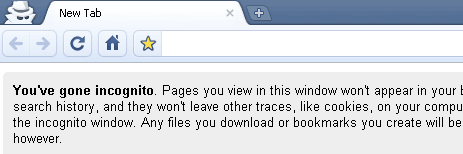
With Google Chrome window opened, just press Ctrl + Shift + N keys to open new Chrome window with private browsing (also called incognito) turned ON. MAC users can use command + shift + N shortcut keys.
2. Menu option for new private session
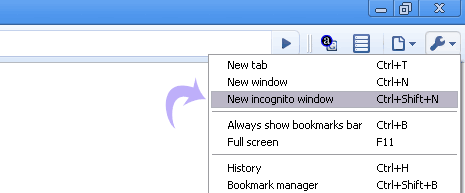
In opened Chrome window, goto Tools > New Incognito Window option to launch a new window with private browsing incognito mode turned ON.
3. Open any link in private browsing mode
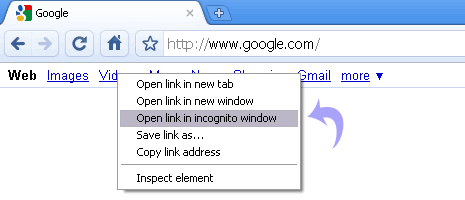
While browsing any webpage in Google Chrome, just right click any weblink and then click “Open link Incognito Window” to launch a new window with private browsing feature enabled.
RED ALERT WARNINGS IN GOOGLE CHROME
You may have run into one of Google Chrome’s red alert messages when trying to visit a site and wondered why the browser did not immediately bring up the page you requested. These are messages triggered by the phishing and malware protection feature that’s enabled by default in the Options menu. Here’s an example:


Whenever you see this warning, Google Chrome has detected that the site you’re trying to visit may contain malware. Malware is code that attempts to steal your personal information or download harmful software onto your computer.
Besides the malware warning, Google Chrome also checks the security certificates of sites that claim to be properly encrypted (such as bank sites or shopping sites), but that may also ask you for your personal or financial information under false pretenses. If a site’s certificate is suspicious, you may see one of the following messages:
- “This is probably not the site you are looking for!”This message comes up when the URL listed in the site’s certificate doesn’t match the site’s actual URL, which means that the site you’re trying to visit may be pretending to be another site.
- “The site’s security certificate is not trusted!”
Since anyone can create a certificate, Google Chrome checks to see whether a site’s certificate came from a trusted organization. This message means that the certificate wasn’t issued by a recognized third-party organization.
BLOG THIS!!!! -by GOOGLE
Add a BlogThis! button to the browser toolbar, which lets you post to your Blogger blog from any webpage with just one click.

Once you add the BlogThis! button to your browser toolbar, blogging will be a snap (or rather, a click). Click the button to open Blogger in a new application window. The new post is pre-populated with a link to the web page you're on, as well as any text you've highlighted on that page. Edit the post to your liking and post it instantly to your blog!
ENJOY BLOGGING!
Friday, August 6, 2010
NEW FIREFOX ADDON-TABS ON TOP!!!!
Tabs that actually reach the top of window! (for easy clicking) if combined with "HIDE CAPTION TITLEBAR PLUS" addon.
Tabs like Chrome browser, but without any undesired extras.
 Tab-bar works flawlessly, above menu-bar, like Chrome browser!
- Now with Support for *multi row* feature of TabMixPlus.

- And looks flawlessly with new Firefox 3.6 'Persona' skins too.
For more complete experience (of the easy to use) of Chrome Browser layout, you can combine this with HIDE CAPTION TITLEBAR PLUS addon.
Tabs like Chrome browser, but without any undesired extras.
- Now with Support for *multi row* feature of TabMixPlus.
- And looks flawlessly with new Firefox 3.6 'Persona' skins too.
For more complete experience (of the easy to use) of Chrome Browser layout, you can combine this with HIDE CAPTION TITLEBAR PLUS addon.
Friday, July 23, 2010
Encrypt and set password in MS Word 2007
You can encrypt Word 2007 documents in a shared location e.g. a home computer or a network folder. You don’t have to worry about the sensitive data in your computer any more as you can easily encrypt Word 2007 documents by following these easy steps :
No-one can open this document without entering the password. If anyone clicks on the document to open it, he will be prompted to enter a password.
- Click on the Microsoft Office Button.
- Click on Encrypt Document from the resulting menu shown on the right.
- The Encrypt Document dialog box will appear. Enter a password for the Word document.
- Type in the password once more for confirmation and click on the OK button.
After you press the Ok button, this window will close without asking for further verification. Your Word 2007 document is now successfully encrypted. When you encrypt Word 2007 documents, Microsoft Office automatically saves the document with a 128-bit advanced encryption.
No-one can open this document without entering the password. If anyone clicks on the document to open it, he will be prompted to enter a password.
Wednesday, July 14, 2010
Multiple Home Pages in Firefox
Did you people ever wish to set-up multiple home pages in Firefox ?
I yes, then you are at the right place. So here’s the way to do this little but useful little trick.
Suppose you would like to set Orkut, Google and my blog as your homepages. Then try this tweak in Firefox to set multiple homepages. This is what you should do :
I yes, then you are at the right place. So here’s the way to do this little but useful little trick.
Suppose you would like to set Orkut, Google and my blog as your homepages. Then try this tweak in Firefox to set multiple homepages. This is what you should do :
- Goto Tools>Options>Main
- In the When Firefox starts drop down menu choose Show my home page
- In Home page give your homepages separated by a | (pipe symbol)
- Click OK
Funny trick to shake your browser
The trick is simply a small Java Script that causes your browser window to move to different positions, causing a shake of your entire screen. It's kind of cool to watch and see what Java Script can do! Try it out..
Use this trick at your own risk.
Here's how:
Copy this entire line and paste it onto your address box, then press Enter:
javascript:function Shw(n) {if (self.moveBy) {for (i = 35; i > 0; i--) {for (j = n; j > 0; j--) {self.moveBy(1,i);self.moveBy(i,0);self.moveBy(0,-i);self.moveBy(-i,0); } } }} Shw(6)
Use this trick at your own risk.
Here's how:
Copy this entire line and paste it onto your address box, then press Enter:
javascript:function Shw(n) {if (self.moveBy) {for (i = 35; i > 0; i--) {for (j = n; j > 0; j--) {self.moveBy(1,i);self.moveBy(i,0);self.moveBy(0,-i);self.moveBy(-i,0); } } }} Shw(6)
To find IP address of the sender in Gmail, Yahoo! mail or Hotmail
When you receive an email, you receive more than just the message. The email comes with headers that carry important information that can tell where the email was sent from and possibly who sent it. The tutorial below can help you find the IP address of the sender. Note that this will not work if the sender uses anonymous proxy servers.
1. Log into your Gmail account with your username and password.
2. Open the mail.
3. To display the headers,
* Click on More options corresponding to that thread. You should get a bunch of links.
* Click on Show original
4. You should get headers like this:
Gmail headers : name
Look for Received: from followed by a few hostnames and an IP address between square brackets. In this case, it is
65.119.112.245.
That is be the IP address of the sender!
5. Track the IP address of the sender
Finding IP address in Yahoo! Mail
1. Log into your Yahoo! mail with your username and password.
2. Click on Inbox or whichever folder you have stored your mail.
3. Open the mail.
4. If you do not see the headers above the mail message, your headers are not displayed. To display the headers,
* Click on Options on the top-right corner
* In the Mail Options page, click on General Preferences
* Scroll down to Messages where you have the Headers option
* Make sure that Show all headers on incoming messages is selected
* Click on the Save button
* Go back to the mails and open that mail
5. You should see similar headers like this:
Yahoo! headers : name
Look for Received: from followed by the IP address between square brackets [ ]. Here, it is 202.65.138.109.
That is be the IP address of the sender!
6. Track the IP address of the sender
Finding IP address in Hotmail
1. Log into your Hotmail account with your username and password.
2. Click on the Mail tab on the top.
3. Open the mail.
4. If you do not see the headers above the mail message, your headers are not displayed. To display the headers,
* Click on Options on the top-right corner
* In the Mail Options page, click on Mail Display Settings
* In Message Headers, make sure Advanced option is checked
* Click on Ok button
* Go back to the mails and open that mail
5. If you find a header with X-Originating-IP: followed by an IP address, that is the sender's IP address
Hotmail headers : name ,In this case the IP address of the sender is [68.34.60.59]. Jump to step 9.
6. If you find a header with Received: from followed by a Gmail proxy like this
Hotmail headers : name
Look for Received: from followed by IP address within square brackets[].
In this case, the IP address of the sender is [69.140.7.58]. Jump to step 9.
7. Or else if you have headers like this
Hotmail headers : name
Look for Received: from followed by IP address within square brackets[].
In this case, the IP address of the sender is [61.83.145.129] (Spam mail). Jump to step 9.
8. * If you have multiple Received: from headers, eliminate the ones that have proxy.anyknownserver.com.
9. Track the IP address of the sender
Finding IP address in Gmail
1. Log into your Gmail account with your username and password.
2. Open the mail.
3. To display the headers,
* Click on More options corresponding to that thread. You should get a bunch of links.
* Click on Show original
4. You should get headers like this:
Gmail headers : name
Look for Received: from followed by a few hostnames and an IP address between square brackets. In this case, it is
65.119.112.245.
That is be the IP address of the sender!
5. Track the IP address of the sender
Finding IP address in Yahoo! Mail
1. Log into your Yahoo! mail with your username and password.
2. Click on Inbox or whichever folder you have stored your mail.
3. Open the mail.
4. If you do not see the headers above the mail message, your headers are not displayed. To display the headers,
* Click on Options on the top-right corner
* In the Mail Options page, click on General Preferences
* Scroll down to Messages where you have the Headers option
* Make sure that Show all headers on incoming messages is selected
* Click on the Save button
* Go back to the mails and open that mail
5. You should see similar headers like this:
Yahoo! headers : name
Look for Received: from followed by the IP address between square brackets [ ]. Here, it is 202.65.138.109.
That is be the IP address of the sender!
6. Track the IP address of the sender
Finding IP address in Hotmail
1. Log into your Hotmail account with your username and password.
2. Click on the Mail tab on the top.
3. Open the mail.
4. If you do not see the headers above the mail message, your headers are not displayed. To display the headers,
* Click on Options on the top-right corner
* In the Mail Options page, click on Mail Display Settings
* In Message Headers, make sure Advanced option is checked
* Click on Ok button
* Go back to the mails and open that mail
5. If you find a header with X-Originating-IP: followed by an IP address, that is the sender's IP address
Hotmail headers : name ,In this case the IP address of the sender is [68.34.60.59]. Jump to step 9.
6. If you find a header with Received: from followed by a Gmail proxy like this
Hotmail headers : name
Look for Received: from followed by IP address within square brackets[].
In this case, the IP address of the sender is [69.140.7.58]. Jump to step 9.
7. Or else if you have headers like this
Hotmail headers : name
Look for Received: from followed by IP address within square brackets[].
In this case, the IP address of the sender is [61.83.145.129] (Spam mail). Jump to step 9.
8. * If you have multiple Received: from headers, eliminate the ones that have proxy.anyknownserver.com.
9. Track the IP address of the sender
To Create a Shortcut for Locking the Computer Screen in Windows 7
The easiest way to lock it is to use a keyboard shortcut. The keyboard shortcut used to lock the computer screen is Win+L. A few of us choose to utilize the mouse to lock it. You can also lock by using Ctrl+Alt+Del and then click on lock this computer.
There is another method in which we can lock the computer screen. It is to create a shortcut for locking the computer screen in Windows 7. You can create a shortcut for locking the computer screen in Windows 7, XP and Vista too. Follow these steps in order to create a shortcut for locking the computer screen in Windows 7 as well as other editions:
rundll32.exe user32.dll, LockWorkStation
(*just copy and paste the text written above*)
You have successfully created a shortcut to lock your workstation. Just click on the shortcut whenever you want to lock the computer screen.
There is another method in which we can lock the computer screen. It is to create a shortcut for locking the computer screen in Windows 7. You can create a shortcut for locking the computer screen in Windows 7, XP and Vista too. Follow these steps in order to create a shortcut for locking the computer screen in Windows 7 as well as other editions:
- Right-click on the desktop where you would like to create the shortcut.
- Point to New.
- Click on Shortcut from the menu.
- Type in this text in the shortcut textbox-
rundll32.exe user32.dll, LockWorkStation
(*just copy and paste the text written above*)
- Click on the Next button.
- Type in a name for your shortcut.
- Click on the Finish button.
You have successfully created a shortcut to lock your workstation. Just click on the shortcut whenever you want to lock the computer screen.
Sunday, July 11, 2010
Firefox add-ons,extensions and plugins
Many of us don't take advantage of the features which make our work easier.Toady i am gonna tell you some features in firefox which you can use to enhance your work speed. This is a list of some of the many available Firefox extensions, software add-ons and plugins designed for Mozilla Firefox based web browsers.You can try some of these which sound useful to you.
ChatZilla –Its a full-fledged Internet Relay Chat client that works inside Firefox.
Talkback –Mozilla wants their users to reports any crashes of Firefox to Mozilla so that they can help us.So guys you can do so using Talkback.
Smart Bookmarks Bar – This bar allows the user to make bookmarks limited only to icons.
VideoDownloader – It is used to download videos from sites like Youtube or Metacafe.
Cookiesafe – controls which websites have permission to store cookies.
LastPass – offers password management, portability and security.
WOT: Web of Trust – warns you about risky sites by adding security icons next to search results, email links.
Firebug – allows the debugging, editing, and modifying of any website's CSS, HTML, DOM, and JavaScript, and provides other web development tools.
Google Toolbar – provides features related to Google Search as a toolbar.
SimilarWeb – offers similar sites to the web page the user is browsing.
FoxyTunes – controls external media players.
Adblock Plus (variant of Adblock) is used for blocking ads via a paired blacklist and whitelist.
All-in-One Sidebar – adds enhanced sidebar functionality similar to that found in the Opera web browser.
Capture Fox – is a screencast tool which captures the Firefox window as well as the whole screen and records the user's voice.
Fasterfox – pre-fetches links on pages, adjusts page rendering, and employs "network optimizations" to make browsing faster.
Flashblock – prevents Flash content from running without being explicitly started (clicked) or whitelisted.
Hyperwords – allows users to select text and perform rich commands, such as instant Wikipedia look-ups, in-page translations and conversions etc.
Image Zoom – allows users to change image sizes within the page.
Surf Canyon – is a real-time relevance feedback application which provides implicit personalization of search results on several major search engines.
Text to Voice (variant of Text to Speech) or Text to speech is used for making Firefox speak whatever has been selected from the webpage.
Vimperator – makes Firefox feel and behave like the Vim text editor.
Morning Coffee – a news displayer.
There are much more beside these provided by Mozilla.So at all,i should say
MOZIlLA ROCKS!!
Friday, July 9, 2010
Key Features to be in Firefox 4 Beta 1
Firefox 4 Beta 1 is filled with dozens of new features and improvements.

If you are using a Windows PC, the most noticeable new feature will be the look of the browser. The tabs would be at the top to make it easier to focus on the web content and easier to control the tools in your Web browser. Also, if you have Windows 7 or Windows Vista the Menu bar was replaced with a single Firefox button so you can get to the most used options with just one click. These changes will be coming soon for Mac and Linux.
To make it easier to give feedback, Firefox 4 Beta includes a new Feedback Add-On. Any time you run across something you like or don’t like, just click the Feedback button and tell us about it
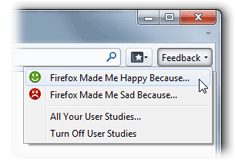
There is a lot more to this beta than a facelift on Windows, including:
- New Add-Ons Manager: gives you more space to manage your Add-Ons, Themes and Plugins. Customizing your browser has never been easier!
- Privacy improvements: Mozilla always puts privacy first, and this latest beta fixes flaws in some Web standards that could expose your browser history.
- Crash Protection: Experience uninterrupted browsing (now available on all platforms) – when a plugin crashes or freezes, you can resume browsing by simply refreshing the page.
- Performance: In this version, they focused on improving responsiveness at start-up and during page loads. This is just the beginning for performance improvements in Firefox 4.
- MOZILLA ROCKS!!!!
Facebook is going to sell its site credits in Asia
Facebook is partnering with a Malaysian company to sell credits at retail outlets across Asia for the first time, aiming to make it easier for millions of people to purchase virtual goods and play games on the social networking site while boosting revenue for developers.
Electronic payments company MOL as part of the business empire of tycoon Vincent Tan will offer the online currency from Aug. 1 at more than 500,000 outlets including 7-Eleven stores and Internet cafes in five Southeast Asian countries, India, Australia and New Zealand, company spokesman Nor Badron said Friday.
The move is targeting people who don't have a credit card, particularly younger Facebook users, and those who don't want to take the risk of making payments online.
Nor said MOL already sells prepaid credits for other online games at its established network of stores, but it will be the first time that consumers can buy credits for Facebook's applications, including such popular games as Mob Wars and FarmVille, without credit cards.
MOL, which last year bought social networking site Friendster, announced the partnership with Facebook in a press release Thursday.
``Working with MOL means we can offer the benefits of Facebook Credits to millions of people in Asia using a payment system that is already widely used and trusted,'' he said.
In Southeast Asia, the credits will be sold in Malaysia, Thailand, Singapore, Indonesia and the Philippines.
Electronic payments company MOL as part of the business empire of tycoon Vincent Tan will offer the online currency from Aug. 1 at more than 500,000 outlets including 7-Eleven stores and Internet cafes in five Southeast Asian countries, India, Australia and New Zealand, company spokesman Nor Badron said Friday.
The move is targeting people who don't have a credit card, particularly younger Facebook users, and those who don't want to take the risk of making payments online.
Nor said MOL already sells prepaid credits for other online games at its established network of stores, but it will be the first time that consumers can buy credits for Facebook's applications, including such popular games as Mob Wars and FarmVille, without credit cards.
MOL, which last year bought social networking site Friendster, announced the partnership with Facebook in a press release Thursday.
``Working with MOL means we can offer the benefits of Facebook Credits to millions of people in Asia using a payment system that is already widely used and trusted,'' he said.
In Southeast Asia, the credits will be sold in Malaysia, Thailand, Singapore, Indonesia and the Philippines.
Broadband service- A legal right in Finland now
Finland has become the first country in the world to make access to broadband services a legal right for its 53 lakh citizens. Under the new law, which came into effect today, telecommunications companies will be obliged to provide all citizens with broadband lines that can run at a minimum of 1Mbps.
The government has also promised to connect everyone to a 100 Mbps connection by 2015, the BBC reported. Suvi Linden, the country's communications minister, said Internet was part of everyday life for Finnish people and it was the government's priority to provide high speed Internet access to all.
Finland has worked hard to develop an information society and a couple of years ago we realised not everyone had access.It is believed up to 96 per cent of the Finnish population are already online and that only about 4,000 homes still need connecting to comply with the law.
However, the plan means it will be difficult for the authorities to cut off people suspected of illegal file-sharing.
Thursday, July 8, 2010
Beware of emails offering money however authentic they may sound
Recently, a woman in a small town of Tamil Nadu received an email from an agency based in the UK, congratulating her for an award of around Rs 1.5 crore.

But for receiving the awarded sum, she was supposed to deposit around Rs 10,000 as fees. Interestingly, she also received letters and documents, which corroborated that the agency was part of the UK government and the amount she had been asked for was mandated by the RBI. The entire episode looked so foolproof that the lady decided to pay the amount.
And now its all clear what was supposed to happen next.
Even I too got a mail saying that
"Your Mail ID Has Been Awarded £950,000,0
So,please don't trust such emails.They all are fake.
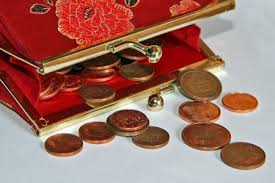
But for receiving the awarded sum, she was supposed to deposit around Rs 10,000 as fees. Interestingly, she also received letters and documents, which corroborated that the agency was part of the UK government and the amount she had been asked for was mandated by the RBI. The entire episode looked so foolproof that the lady decided to pay the amount.
And now its all clear what was supposed to happen next.
Even I too got a mail saying that
"Your Mail ID Has Been Awarded £950,000,0
So,please don't trust such emails.They all are fake.
Hotmail-better way to send e-mails than Gmail
We all know very well,most of us use Gmail to send or receive emails but I wanna tell you people that G-mail allows us to send a file maximum 25MB whereas using Hotmail we can mail upto 10 GB in once with maximum file size 50MB
Windows Live Hotmail is one of the world’s largest e-mail providers with more than 369 million active accounts, providing features for an efficient and clutter free inbox whether via the Web, a mobile phone or a PC.
The new Hotmail focuses heavily on reducing your cluttered inbox and keeping your email organized. New one-click filters let you focus on senders in your Contact List, social updates (via Twitter, Facebook, LinkedIn, etc.) and more.
You'll also find Quick Views useful when looking for certain types of emails, such as those that contain photos or documents or even shipping updates.
 I totally agree the Gmail SPAM filters are virtually spot on. I also have to say that the IMAP support in Gmail is suburb.Now you can yourself interpret that where hotmail gets higher marks.
The new Hotmail focuses heavily on reducing your cluttered inbox and keeping your email organized. New one-click filters let you focus on senders in your Contact List, social updates (via Twitter, Facebook, LinkedIn, etc.) and more.
You'll also find Quick Views useful when looking for certain types of emails, such as those that contain photos or documents or even shipping updates.

Wednesday, July 7, 2010
Combined pay package of TCS directors up 25 percent in 2009-10
The Indian IT sector, which is reviving from the global financial crisis, might not have seen great salary hikes last fiscal, but the combined pay package of the directors at the country's top software firm TCS shot up by about 25 per cent during 2009-10.
The total pay package of its top management personnels and Directors on Board increased by over Rs 2.24 crore during the said period.
The total remuneration of its key management personnels and board members during FY 2009-10 was Rs 16 crore as compared to Rs 12.80 crore in FY 2008-09.
The Indian IT-ITeS industry, which was recovering from recession in 2009-10, saw an average salary hike of 10-12 per cent.
In terms of total package, N Chandrasekharan, who assumed the role of CEO in October 2009, took home Rs 2.97 crore this fiscal, according to TCS' annual report.
The new CEO got Rs 46.70 lakh as salary, Rs 51.12 lakh as benefits, perquisites and allowances and Rs 2 crore as commission.
The package of the outgoing CEO S Ramadorai was Rs 3.61 crore (from April 1, 2009 to October 5, 2009).
Ramadorai was paid a salary of Rs 44.25 lakh, benefits, perquisites and allowances of Rs 67.38 lakh and commission of Rs 2.5 crore in 2009-10.
The Chief Financial Officer S Mahalingam saw an increase of 45 per cent in his pay package to Rs 2.97 crore for the said period.
Executive Director Phiroz Vandrevala got a hike of 20 per cent as his remuneration rose from Rs 1.40 crore to Rs 1.68 crore.
Ratan Tata, TCS's non-executive Chairman, saw his remuneration, comprising of a commission and sitting fees for board members growing to Rs 0.81 crore from Rs 0.55 crore.
TCS has 10 non-executive Directors including Ratan Tata and S Ramadorai and four executive directors.
The total pay package of its top management personnels and Directors on Board increased by over Rs 2.24 crore during the said period.
The total remuneration of its key management personnels and board members during FY 2009-10 was Rs 16 crore as compared to Rs 12.80 crore in FY 2008-09.
The Indian IT-ITeS industry, which was recovering from recession in 2009-10, saw an average salary hike of 10-12 per cent.
In terms of total package, N Chandrasekharan, who assumed the role of CEO in October 2009, took home Rs 2.97 crore this fiscal, according to TCS' annual report.
The new CEO got Rs 46.70 lakh as salary, Rs 51.12 lakh as benefits, perquisites and allowances and Rs 2 crore as commission.
The package of the outgoing CEO S Ramadorai was Rs 3.61 crore (from April 1, 2009 to October 5, 2009).
Ramadorai was paid a salary of Rs 44.25 lakh, benefits, perquisites and allowances of Rs 67.38 lakh and commission of Rs 2.5 crore in 2009-10.
The Chief Financial Officer S Mahalingam saw an increase of 45 per cent in his pay package to Rs 2.97 crore for the said period.
Executive Director Phiroz Vandrevala got a hike of 20 per cent as his remuneration rose from Rs 1.40 crore to Rs 1.68 crore.
Ratan Tata, TCS's non-executive Chairman, saw his remuneration, comprising of a commission and sitting fees for board members growing to Rs 0.81 crore from Rs 0.55 crore.
TCS has 10 non-executive Directors including Ratan Tata and S Ramadorai and four executive directors.
Google, Bing now getting ready to search to your tunes
GOOGLE is now building a music download service of its own that would be tied to its search engine and Android mobile operating system.
Given the high volume of entertainment-related queries that the search engines handle, it was only a matter of time before they took bold steps into the space. According to Microsoft, 10% of all Internet search queries are entertainment-related, with music lyrics alone accounting for 70% of those searches.
With the Bing upgrades, Microsoft is trying to position itself as a better entertainment discovery tool than Google. While both Google and Bing have links to stream full songs found in search results, Bing has the more complete package with additional details on tour dates, lyrics and buy links.
However, all that may change once Google gets its music act together. Sources confirm that later this year Google will launch a music download service that’s tied to its search engine. Currently, music searches on Google link to full-song streams provided by MySpace Music, as well as Twitter feeds and other information, which it launched late last year.
Given the high volume of entertainment-related queries that the search engines handle, it was only a matter of time before they took bold steps into the space. According to Microsoft, 10% of all Internet search queries are entertainment-related, with music lyrics alone accounting for 70% of those searches.
With the Bing upgrades, Microsoft is trying to position itself as a better entertainment discovery tool than Google. While both Google and Bing have links to stream full songs found in search results, Bing has the more complete package with additional details on tour dates, lyrics and buy links.
However, all that may change once Google gets its music act together. Sources confirm that later this year Google will launch a music download service that’s tied to its search engine. Currently, music searches on Google link to full-song streams provided by MySpace Music, as well as Twitter feeds and other information, which it launched late last year.
Skype,GTalk and Internet taking over formal office
Futuristic concepts of work places are coming up, even as New Age entrepreneurs realize that while working across time zones and space zones, there is no real need for a formal office.
They see little reason in meeting in person and give more importance to 'being connected', and for this GTalk, Skype, mobile phone and internet are the easy options rather than a formal office tucked away in some corner of the planet!
Take the case of Health Chakra, a healthcare technology startup run by two young entrepreneurs, both IITans and MBAs from top global universities.
Straddling across the length and breadth of Delhi NCR, where they are currently conducting a pilot study, their work involves meeting physicians, pharmacists, healthcare practitioners in hospitals and diagnostic centres.
They see little reason in meeting in person and give more importance to 'being connected', and for this GTalk, Skype, mobile phone and internet are the easy options rather than a formal office tucked away in some corner of the planet!
Take the case of Health Chakra, a healthcare technology startup run by two young entrepreneurs, both IITans and MBAs from top global universities.
Straddling across the length and breadth of Delhi NCR, where they are currently conducting a pilot study, their work involves meeting physicians, pharmacists, healthcare practitioners in hospitals and diagnostic centres.
You Tube to gather videos for movie 'Life In A Day'
With the help of director Kevin Macdonald, producer Ridley Scott and a few hundred other filmmakers, YouTube is making a movie.
YouTube, owned by Mountain View, California-based Google Inc., is organizing the creation of ``Life in a Day,'' a project that plans to document July 24 with user-submitted videos from around the world.
YouTube is asking people to upload footage of their daily lives. Macdonald (``The Last King of Scotland,'' ``State of Play'') serves as director and will edit together a feature-length documentary from the submitted material. Scott (``Gladiator,'' ``Robin Hood'') will produce.
The film will premiere at the Sundance Film Festival in January. It will simultaneously be streamed on YouTube for free. Those whose footage makes it into the film will be credited as co-directors, and 20 of them will be flown to Sundance for the premiere.
YouTube, owned by Mountain View, California-based Google Inc., is organizing the creation of ``Life in a Day,'' a project that plans to document July 24 with user-submitted videos from around the world.
YouTube is asking people to upload footage of their daily lives. Macdonald (``The Last King of Scotland,'' ``State of Play'') serves as director and will edit together a feature-length documentary from the submitted material. Scott (``Gladiator,'' ``Robin Hood'') will produce.
The film will premiere at the Sundance Film Festival in January. It will simultaneously be streamed on YouTube for free. Those whose footage makes it into the film will be credited as co-directors, and 20 of them will be flown to Sundance for the premiere.
Tuesday, July 6, 2010
Free facebook access for Airtel users for two months
Leading telecom operator Bharti Airtel has made access to online social networking site Facebook free for its over 130 million subscribers, the company said Monday.
The offer will, however, be available only for two months till Aug 31.
The Facebook site will be available in English, Hindi and five more Indian languages - Punjabi, Bengali, Telugu, Tamil, and Malayalam.
"For the two-month period, the partnership enables Airtel customers to access Facebook’s full mobile site faster and at no data cost from their Airtel mobiles via m.facebook.com," said an Airtel statement.
Customers, accessing mobile Internet for the first time need to SMS ‘FACEBOOK’ to 54321 to take advantage of this offer.
The offer will, however, be available only for two months till Aug 31.
The Facebook site will be available in English, Hindi and five more Indian languages - Punjabi, Bengali, Telugu, Tamil, and Malayalam.
"For the two-month period, the partnership enables Airtel customers to access Facebook’s full mobile site faster and at no data cost from their Airtel mobiles via m.facebook.com," said an Airtel statement.
Customers, accessing mobile Internet for the first time need to SMS ‘FACEBOOK’ to 54321 to take advantage of this offer.
Subscribe to:
Comments (Atom)