Do you have a folder to which you want instant access from anywhere on your computer? For example, if you want the My Music folder to pop up while Internet Explorer or Word is maximized, follow these steps:
1.Select the folder in Windows Explorer.
2.Create a shortcut, and place it on the desktop. (You create a shortcut by opening the folder, pointing to New on the File menu, then clicking Shortcut. Drag the shortcut to your desktop.)
3.Right–click the new shortcut, and then click Properties.
4.In the Properties dialog box, click the Shortcut tab, and in the Shortcut key box, enter a Control key combination or a Control–Shift key combination, (that is, CTRL+ALT+M or CTRL+SHIFT+M when M is for music), and then click OK.
Anytime you hit the key combination you specified, your folder will open, even when other programs are maximized! This tip can be applied to folders, programs, and text file shortcuts that are placed on the desktop.
Monday, August 30, 2010


Sunday, August 29, 2010
Investment of Rs 300 cr over 3 yrs expected by HCL Infosystems
IT firm HCL Infosystems on Friday said it will invest up to Rs 300 crore over the next 2-3 years on consolidating its facilities and expanding its software business. The company, which announced its results today, has posted a consolidated net profit of Rs 67.23 crore for the quarter ended June 30, up 11.27 per cent. They have bought 25 acres land in Greater Noida and the plan is to consolidate their properties which are currently scattered across various units. Also, it will house their software business. The expected investment over the next 2-3 years will be about Rs 200-300 crore and the new units would have a seating capacity of about 5,000 people. The investment would be funded through internal accruals.
Saturday, August 28, 2010
Diaspora-An alternative to facebook, to be launched on September 15
Diaspora, an open alternative to Facebook, is set to be launched, say developers of the project.
Diaspora, which describes itself, as a "privacy-aware, personally-controlled" social network will be launched on 15 September.
The open-source project came into the limelight earlier this year when Facebook was forced to simplify its privacy settings, after they were criticised for being overly complex and confusing.
The project, developed by four US students, raised 200,000 dollar.
"We have Diaspora working, we like it, and it will be open-sourced on September 15th," the BBC quoted the team as writing on their blog.
The team said they had spent the summer "building clear, contextual sharing".
"That means an intuitive way for users to decide, and not notice deciding, what content goes to their co-workers and what goes to their drinking buddies. We know that's a hard [user interface] problem and we take it seriously."
Diaspora, which describes itself, as a "privacy-aware, personally-controlled" social network will be launched on 15 September.
The open-source project came into the limelight earlier this year when Facebook was forced to simplify its privacy settings, after they were criticised for being overly complex and confusing.
The project, developed by four US students, raised 200,000 dollar.
"We have Diaspora working, we like it, and it will be open-sourced on September 15th," the BBC quoted the team as writing on their blog.
The team said they had spent the summer "building clear, contextual sharing".
"That means an intuitive way for users to decide, and not notice deciding, what content goes to their co-workers and what goes to their drinking buddies. We know that's a hard [user interface] problem and we take it seriously."
Phone calls via Gmail

While Google had already offered computer-to-computer voice and video chat services, it said that starting on Wednesday it will now allow calls to home phones and mobile phones directly from Gmail for the first time.
Google promised free calls to US and Canadian phones from Gmail for the rest of this year and said it would charge low rates for calls made to other countries. For example it said calls to Britain, France, Germany, China and Japan would be as low as 2 cents per minute.
Analysts said the service would likely be a bigger competitive threat to services like Skype's than to traditional phone companies, which have already been cutting their call prices in recent years in response to stiff competition.
Skype became popular by first offering free computer-to-computer voice and video services. Like Skype, Rethemeier said the Google service will likely be much more popular among US consumers making international calls, than among people calling friends inside the country.
Google said making a call through its service works like a normal phone in that a user could click on the "call phone" option in their chat buddy list in Gmail and type in the number or enter a contact's name. Calls that cost money will be charged from an online account that users can top up with a credit card, Google said.
To hide facebook status from some of your friends
Someone you have ties to, whether it’s a co-worker, your boss, or even worse, a parent, has finally discovered social networking and wants to be your newest facebook friend. For me personally, that’s no big deal.

On your Facebook home page, you should see the 'accont' menu.Open that menu and go to ‘Privacy Settings’.


Monday, August 16, 2010
START PRIVATE BROWSING : GOING UNDERCOVER IN CHROME
Sometimes you don't want to leave traces on your computer of some site you visit. Google Chrome's incognito windows are made just for this. Visit a website in an incognito window, and when you close the window, the browser has no record of you having been there.
While browsing in private mode, no history cache or cookies are stored. However, any file downloaded or website bookmarked is preserved. Here are 3 ways to start private internet browsing session in Google Chrome.


While browsing in private mode, no history cache or cookies are stored. However, any file downloaded or website bookmarked is preserved. Here are 3 ways to start private internet browsing session in Google Chrome.
1. Shortcut key to start private session
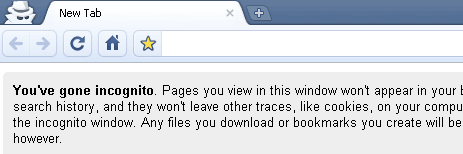
With Google Chrome window opened, just press Ctrl + Shift + N keys to open new Chrome window with private browsing (also called incognito) turned ON. MAC users can use command + shift + N shortcut keys.
2. Menu option for new private session
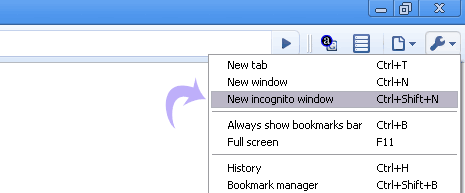
In opened Chrome window, goto Tools > New Incognito Window option to launch a new window with private browsing incognito mode turned ON.
3. Open any link in private browsing mode
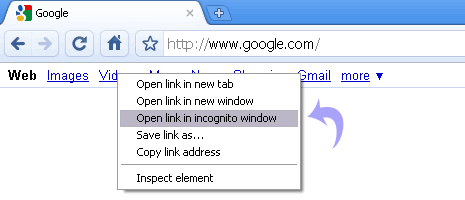
While browsing any webpage in Google Chrome, just right click any weblink and then click “Open link Incognito Window” to launch a new window with private browsing feature enabled.
RED ALERT WARNINGS IN GOOGLE CHROME
You may have run into one of Google Chrome’s red alert messages when trying to visit a site and wondered why the browser did not immediately bring up the page you requested. These are messages triggered by the phishing and malware protection feature that’s enabled by default in the Options menu. Here’s an example:


Whenever you see this warning, Google Chrome has detected that the site you’re trying to visit may contain malware. Malware is code that attempts to steal your personal information or download harmful software onto your computer.
Besides the malware warning, Google Chrome also checks the security certificates of sites that claim to be properly encrypted (such as bank sites or shopping sites), but that may also ask you for your personal or financial information under false pretenses. If a site’s certificate is suspicious, you may see one of the following messages:
- “This is probably not the site you are looking for!”This message comes up when the URL listed in the site’s certificate doesn’t match the site’s actual URL, which means that the site you’re trying to visit may be pretending to be another site.
- “The site’s security certificate is not trusted!”
Since anyone can create a certificate, Google Chrome checks to see whether a site’s certificate came from a trusted organization. This message means that the certificate wasn’t issued by a recognized third-party organization.
BLOG THIS!!!! -by GOOGLE
Add a BlogThis! button to the browser toolbar, which lets you post to your Blogger blog from any webpage with just one click.

Once you add the BlogThis! button to your browser toolbar, blogging will be a snap (or rather, a click). Click the button to open Blogger in a new application window. The new post is pre-populated with a link to the web page you're on, as well as any text you've highlighted on that page. Edit the post to your liking and post it instantly to your blog!
ENJOY BLOGGING!
Friday, August 6, 2010
NEW FIREFOX ADDON-TABS ON TOP!!!!
Tabs that actually reach the top of window! (for easy clicking) if combined with "HIDE CAPTION TITLEBAR PLUS" addon.
Tabs like Chrome browser, but without any undesired extras.
 Tab-bar works flawlessly, above menu-bar, like Chrome browser!
- Now with Support for *multi row* feature of TabMixPlus.

- And looks flawlessly with new Firefox 3.6 'Persona' skins too.
For more complete experience (of the easy to use) of Chrome Browser layout, you can combine this with HIDE CAPTION TITLEBAR PLUS addon.
Tabs like Chrome browser, but without any undesired extras.
- Now with Support for *multi row* feature of TabMixPlus.
- And looks flawlessly with new Firefox 3.6 'Persona' skins too.
For more complete experience (of the easy to use) of Chrome Browser layout, you can combine this with HIDE CAPTION TITLEBAR PLUS addon.
Subscribe to:
Comments (Atom)